About your new homepage
 Updated
by
Chris Storms
Updated
by
Chris Storms
The HR Self-service homepage provides you with a wealth of information about your organisation in the form of a dashboard.
The dashboard consists of two tabs: ‘Team’ and ‘Personal’.
The Team dashboard
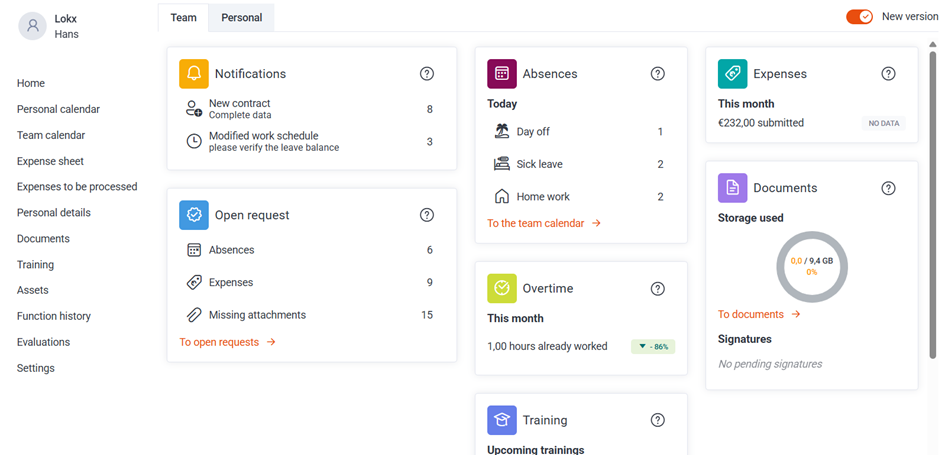
The Team dashboard displays information about the team for which you are responsible and is only available to administrators and approvers. The information available (in ‘widgets’) depends on the modules (e.g. absences or expenses) for which you are an administrator or approver.
An administrator receives information about the entire organisation, whilst an approver receives information about the department for which they are an approver.
Open requests
Overview of requests within the team that still need to be processed (e.g. absences, expenses), depending on the modules for which the user has permissions.
Notifications (Team)
Team‑related notifications such as new contracts, modified work schedules, onboarding forms returned by new hires, proposed trainings or missing roles.
Today’s absences
Overview of today’s absences within the team. Only absences that are actually booked in the calendar are included.
Expenses (monthly overview)
Expenses booked within the team for the current month, optionally including a month‑to‑date comparison with the previous month.
Overtime (monthly overview)
Overview of overtime booked within the team for the current month, including a month‑to‑date comparison if sufficient data is available.
Documents
Shows the amount of storage used (with a maximum quota per employee) and the number of open signature requests.
Trainings
Overview of upcoming trainings as registered in the Training module.
Birthdays
List of upcoming birthdays within the organisation or team.
The Personal dashboard
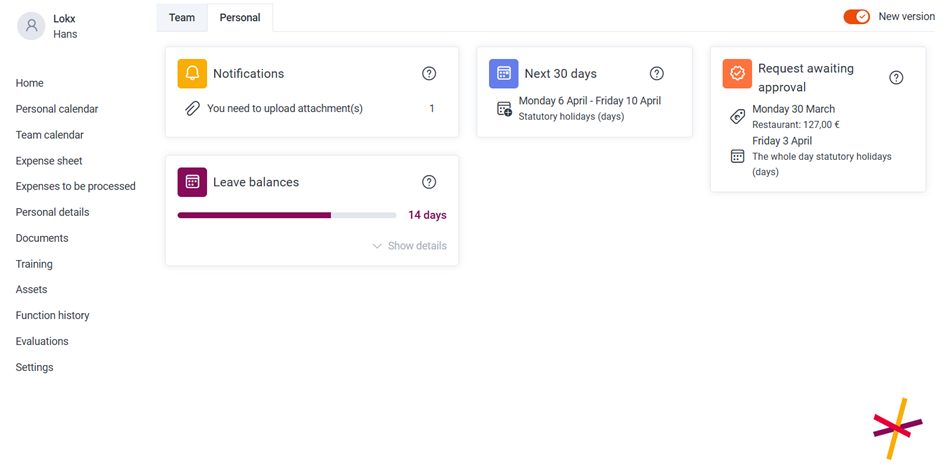
The Personal dashboard displays information about yourself. The information available (in ‘widgets’) depends on the modules (e.g. absences or expenses) to which you have access.
Personal leave balances
Overview of available leave balances, with the option to view the details per balance.
Upcoming absences and planned overtime
List of planned absences and overtime for the next 30 days.
Requests awaiting approval
Overview of personal requests that have not yet been approved or rejected.
Notifications (Personal)
Personal notifications such as missing attachments, documents that still need to be signed, reminders for expiring trainings or assets, and changes to trainings the employee is enrolled in.
Dividing the dashboards into team and personal sections has a number of advantages. For example, it ensures there is a clear distinction between notifications addressed to you as an employee and those addressed to you as an approver or administrator.
As an administrator or delegate, you also have access to other employees’ dashboards. However, you will only see the information to which you are entitled based on your own role. Suppose you are an administrator for absences (but not for expenses) and you open the dashboard of someone who is an administrator for expenses; you will see the widget, but the content will be hidden with the message ‘Sorry. You do not have access to this information.’